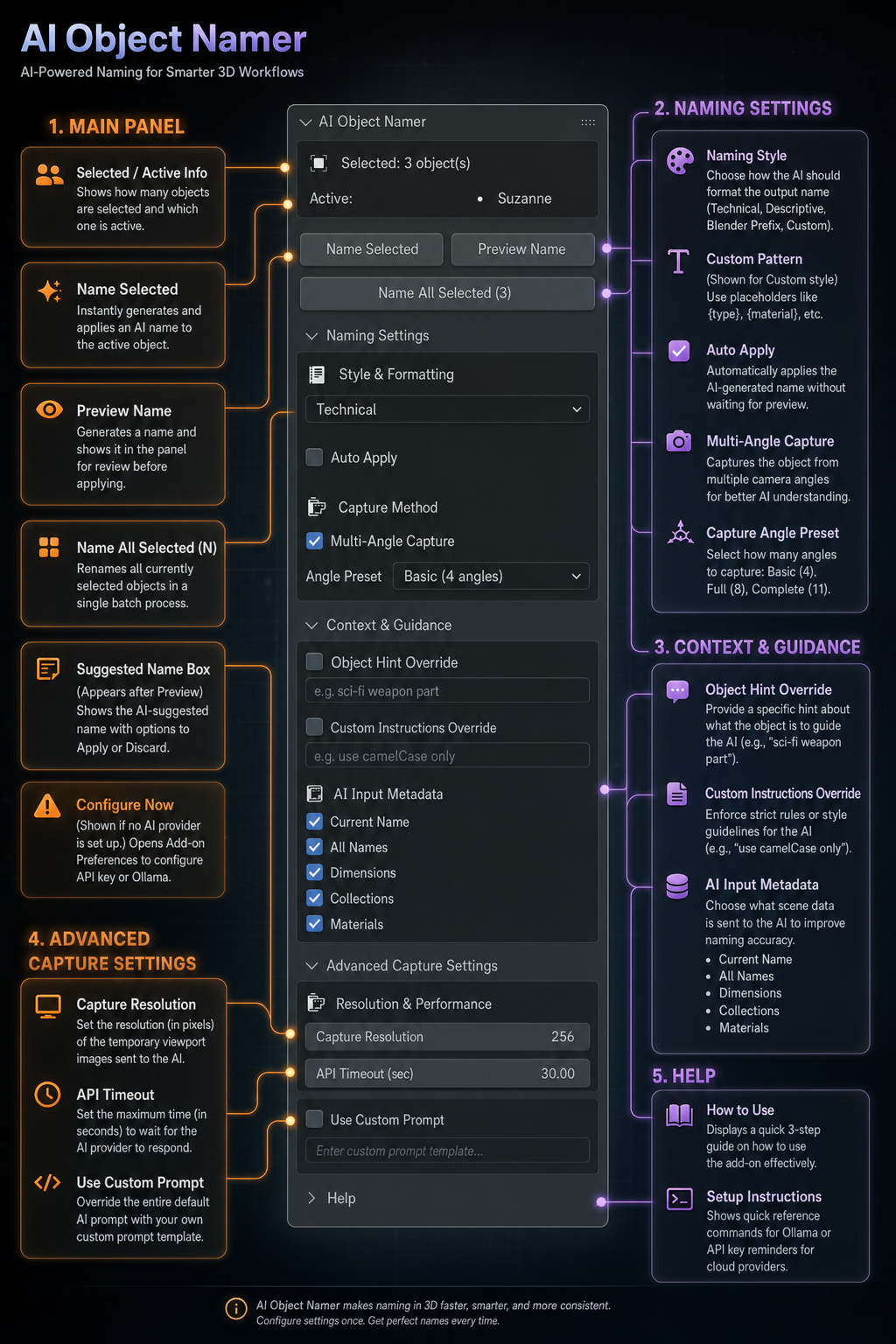
Automatically name your 3D objects in Blender using AI vision analysis. Select an object, click a button, and get a meaningful name — instantly.
Renders your 3D object in isolation, sends it to a vision model, and returns an accurate, descriptive name based on visual geometry.
Run completely local and free with Ollama (e.g. LLaVA model), or hook into powerful cloud models from OpenAI, Anthropic, or Google.
Render objects from multiple angles (up to 11 viewpoints) to ensure the AI detects hidden parts and shapes accurately.
Select dozens of objects and rename them all at once. The addon processes each object cleanly in a queue.
Match your pipeline naming convention: Choose from Descriptive, Technical, Blender Prefix, or a Custom formatted template.
Provide contextual hints like "vehicle prop" or add custom formatting rules such as "always lowercase".
Feed dimensional scales, materials list, collections, and scene contents to the AI for highly context-aware naming suggestions.
Isolates objects temporarily and restores viewport states, active cameras, selection and collections settings after completion.
obj_namer (or zip the folder first).
Edit > Preferences > Add-ons. Click the top-right menu and choose Install from Disk.... Select the obj_namer folder or zip.
Run your AI model locally. It keeps 100% of your 3D asset images fully private on your machine.
ollama serve in your terminal.ollama pull llava:13bSetup cloud endpoints using your own API credentials. Input keys directly in preferences:
Operating the AI Object Namer is simple:
N and click the AI Namer tab).
Format suggested names using formatting layouts to match your scene naming conventions:
| Style | Example Format Output |
|---|---|
| Descriptive | Wooden Chair, Steel Gear |
| Technical | Chair_01, DriveShaft_A |
| Blender Prefix | OBJ_Chair_001, MESH_Gear_Main |
| Custom Template | {type}_{name}_{material} |
ollama serve) and that you've run `ollama pull llava:13b`.